Monday, March 13, 2017

Android - Load more and Empty view in RecycleView

If you already read my previous blog that is related to this. Almost same thing i'm going implement here except empty text view. it will visible if list has no items. I'm going to create a custom RecylceView for track load more event.
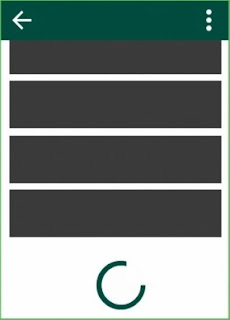

AppRecyclerView is a customized class of RecyclerView that track load more event on list scroll. 

1. Here is your screen layout file that contains custom recyclerView, progressBar and Textview that shows the empty message "Record not found".


<FrameLayout
        android:layout_width="match_parent"
        android:layout_height="match_parent"
       >

        <com.demo.AppRecyclerView
            android:id="@+id/list_rv"
            android:layout_width="match_parent"
            android:layout_height="match_parent"
            android:scrollbars="none"
            />

        <ProgressBar
            android:id="@+id/list_pb_loader"
            android:layout_width="20dp"
            android:layout_height="20dp"
            android:layout_gravity="bottom|center"
            android:layout_marginBottom="10dp"
            android:background="@color/colorTransparent"
            android:indeterminateTint="@color/colorPrimaryDark"
            android:indeterminateTintMode="src_atop"
            android:visibility="gone"
            />

        <TextView
            android:id="@+id/list_tv_list_msg"
            style="@style/AppBigTextViewStyleLabel"
            android:layout_width="match_parent"
            android:layout_gravity="center"
            android:gravity="center"
            android:text="Record not found"
            android:textColor="@color/colorLightGrey"
            android:visibility="gone"
            />
    </FrameLayout>


2.  In your Activity/Fragment setup the following views.


        ProgressBar progressBar = (ProgressBar) rootView.findViewById(R.id.fragment_product_list_pb_loader);
        progressBar.getIndeterminateDrawable().setColorFilter(ContextCompat.getColor(getContext(), R.color.colorPrimaryDark), PorterDuff.Mode.SRC_IN);

        rvProductList = (AppRecyclerView) rootView.findViewById(R.id.fragment_product_list_rv);

       // Provide load more view that will visible when last item come on screen.
        rvProductList.setLoadMoreProgress(progressBar); 

       //Set listener that invoke when laod more event invoke from custom AppRecyclerView
        rvProductList.setLoadMoreListener(presenter);
           rvProductList.setEmptyView(rootView.findViewById(R.id.fragment_product_list_tv_list_msg));

3. Customize AppRecyclerView


public class AppRecyclerView extends RecyclerView {
    private ProgressBar progressBar;
    private View emptyView;
    private boolean loading;
    private OnLoadMoreListener onLoadMoreListener; 


   //It will observe item of list and show empty view if list not contains any item.
    private AdapterDataObserver emptyObserver = new AdapterDataObserver() {
        @Override
        public void onChanged() {
            Adapter<?> adapter = getAdapter();
            if (adapter != null && emptyView != null) {
                if (adapter.getItemCount() == 0) {
                    emptyView.setVisibility(View.VISIBLE);
                    AppRecyclerView.this.setVisibility(View.GONE);
                } else {
                    emptyView.setVisibility(View.GONE);
                    AppRecyclerView.this.setVisibility(View.VISIBLE);
                }
            }
        }
    };


    public AppRecyclerView(Context context) {
        super(context);
    }


    public AppRecyclerView(Context context, AttributeSet attrs) {
        super(context, attrs);
    }


    public AppRecyclerView(Context context, AttributeSet attrs, int defStyle) {
        super(context, attrs, defStyle);
    }

    @Override
    public void setAdapter(Adapter adapter) {
        super.setAdapter(adapter);
        if (adapter != null && !adapter.hasObservers()) {
            adapter.registerAdapterDataObserver(emptyObserver);
        }

        emptyObserver.onChanged();
    }


    public void setEmptyView(View emptyView) {
        this.emptyView = emptyView;
    }

    @Override
    public void stopScroll()
    {
        try {
            super.stopScroll();
        } catch (NullPointerException exception) {
            Crashlytics.logException(exception);
            /**
             *  The mLayout has been disposed of before the
             *  RecyclerView and this stops the application
             *  from crashing.
             */
        }
    }


    public void setLoadMoreListener(OnLoadMoreListener loadMoreListener) {

        this.onLoadMoreListener = loadMoreListener;

        addOnScrollListener(new RecyclerView.OnScrollListener() {
            @Override
            public void onScrolled(RecyclerView recyclerView,
                                   int dx, int dy)
            {
                super.onScrolled(recyclerView, dx, dy);
                if (getLayoutManager() instanceof LinearLayoutManager) {
                    validateListScroll(dy, (LinearLayoutManager) getLayoutManager());
                } else {
                    validateGridListScroll(dy, (GridLayoutManager) getLayoutManager());
                }
            }
        });
    }


    private void validateGridListScroll(int dy, GridLayoutManager gridLayoutManager) {
        if (dy > 0 && (gridLayoutManager.getChildCount() + gridLayoutManager.findFirstVisibleItemPosition() + 1) >= gridLayoutManager.getItemCount() && !loading) {
            setLoading(true);
            if (onLoadMoreListener != null) {
                onLoadMoreListener.onLoadMore();
            }
        }
    }


    private void validateListScroll(int dy, LinearLayoutManager linearLayoutManager) {
        if (dy > 0 && (linearLayoutManager.getChildCount() + linearLayoutManager.findFirstVisibleItemPosition() + 1) >= linearLayoutManager.getItemCount() && !loading) {
            setLoading(true);
            if (onLoadMoreListener != null) {
                onLoadMoreListener.onLoadMore();
            }
        }
    }

    public void setLoading(boolean loading) {
        this.loading = loading;
        if (progressBar != null) {
            if (loading) {
                progressBar.setVisibility(View.VISIBLE);
            } else {
                progressBar.setVisibility(View.GONE);
            }
        }
    }


    public void setLoadMoreProgress(ProgressBar progressBar) {
        this.progressBar = progressBar;
    }

    public interface OnLoadMoreListener {
    
        void onLoadMore();
    }
}
Share:

Android - Share multiple files with Wi-Fi Direct

If you already read my previous blog that shows how can we find and connect near available device in Wi-fi Direct environment. In this blog, i'm going to explain how can share multiple files with Wi-Fi Direct.

To achieve this we going to use service.

1. ProgressSenderService is using for send files at the sender side.
2. ProgressReceiverService is using from receive files at the receiver side.


1. Add the services in your project manifest.


   <service android:name=".ProgressReceiverService"/>
   <service android:name=".ProgressSenderService"/>

2. Get address of receiver device.

We can get the address of another device by using the connect() of WifiP2pManager that explains blog steps 5 and 7.


3. Start receiver service.

On file receiver side register and start ProgressReceiverService

Intent receiveIntent = new Intent(activity, ProgressReceiverService.class);
            receiveIntent.setAction(ProgressReceiverService.ACTION_RECEIVE);
            activity.startService(receiveIntent);

            LocalBroadcastManager.getInstance(activity).registerReceiver(mainReceiver, new IntentFilter(ProgressReceiverService.ACTION_RECEIVE));

4. Start sender service.

On file sender side register and start ProgressSenderService with put a bundle that contains full path list of files and receiver address.

Intent receiveIntent = new Intent(activity, ProgressSenderService.class);
                receiveIntent.setAction(ProgressSenderService.ACTION_SEND_FILE);

         
                Bundle b = new Bundle();
                b.putStringArrayList("files", ArrayList<FileFullPathString>);

                receiveIntent.putExtra("files_bundle", b);
                receiveIntent.putExtra("address", p2pInfo.groupOwnerAddress.getHostAddress());
                activity.startService(receiveIntent);

                LocalBroadcastManager.getInstance(activity).registerReceiver(mainReceiver, new IntentFilter(ProgressSenderService.ACTION_SEND_FILE));

5. Sender service.


import android.app.IntentService;
import android.content.Intent;

import java.io.BufferedInputStream;
import java.io.BufferedOutputStream;
import java.io.DataOutputStream;
import java.io.FileInputStream;
import java.io.IOException;
import java.net.InetSocketAddress;
import java.net.Socket;
import java.util.ArrayList;

/**
 * A service that process each file transfer request i.e Intent by opening a
 * socket connection with the WiFi Direct Group Owner and writing the file
 */
public class ProgressSenderService extends IntentService {
    private static final int SOCKET_TIMEOUT = 5000;
    public static final String ACTION_SEND_FILE = "com.demo.wifidirect.SEND_FILE";

    public ProgressSenderService(String name) {
        super(name);
    }

    public ProgressSenderService() {
        super("ProgressSenderService");
    }

    /*
     * (non-Javadoc)
     * @see android.app.IntentService#onHandleIntent(android.content.Intent)
     */
    @Override
    protected void onHandleIntent(Intent intent) {
        if (intent.getAction().equals(ACTION_SEND_FILE)) {

            ArrayList<String> files = intent.getBundleExtra("files_bundle").getStringArrayList("files");
            String mAddress = intent.getStringExtra("address");

            Socket socket = new Socket();

            try {          
                socket.bind(null);

                socket.connect(new InetSocketAddress(mAddress, 8988), SOCKET_TIMEOUT);
         
                BufferedOutputStream bos = new BufferedOutputStream(socket.getOutputStream());
                DataOutputStream dos = new DataOutputStream(bos);

                dos.writeInt(files.size());

                for (int index = 0; index < files.size(); index++) {
                    ShareFile file = new ShareFile(files.get(index));

                    Log.d("5", file.getPath());
                    long length = file.length();
                    dos.writeLong(length);
                    Log.d("6", "length: " + length);
                    String name = file.getName();

                    dos.writeUTF(name);
                    FileInputStream fis = new FileInputStream(file);
                    BufferedInputStream bis = new BufferedInputStream(fis);

                    transfer(bis, bos, length, index);

                    bis.close();

                    Thread.sleep(1000);
                    Log.d("7", "Client: Data written");
                }

                dos.close();
            } catch (IOException e) {
                Log.e("8", e.getMessage());
            } catch (InterruptedException e) {
                e.printStackTrace();
            } finally {
                allFileSentNotify();
                if (socket != null) {
                    if (socket.isConnected()) {
                        try {
                            socket.close();
                        } catch (IOException e) {
                            e.printStackTrace();
                        }
                    }
                }

            }
            Log.d("9", "Client: stop service");
        }
    }

    private void transfer(BufferedInputStream bis, BufferedOutputStream bos, long length, int index) throws IOException {
        int theByte;

        int count = 0;
        long totalSent = 0;
        byte[] buffer = new byte[1024];
        while ((theByte = bis.read(buffer)) > 0) {
            try {
                bos.write(buffer, 0, theByte);
            } catch (IOException e) {
                e.printStackTrace();
            }
            bos.flush();

            totalSent += theByte;

            if (count == 50) {
                count = 0;
                     Log.d(TAG, "progress: " + length+"  "+index);
            }
            count++;
        }
    }
}


6. Receiver service.


import android.app.IntentService;
import android.content.Context;
import android.content.Intent;
import android.media.MediaScannerConnection;
import android.net.Uri;
import android.support.v4.content.LocalBroadcastManager;
import android.util.Log;

import java.io.BufferedInputStream;
import java.io.DataInputStream;
import java.io.File;
import java.io.FileOutputStream;
import java.io.IOException;
import java.net.InetSocketAddress;
import java.net.ServerSocket;
import java.net.Socket;
import java.util.ArrayList;
import java.util.List;

public class ProgressReceiverService extends IntentService {
    /**
     * Creates an IntentService.  Invoked by your subclass's constructor.
     *
     * @param name Used to name the worker thread, important only for debugging.
     */

    private static final String TAG = ProgressReceiverService.class.getName();
    public static final String ACTION_RECEIVE = "action_receive";

    private List<String> mFileName = new ArrayList<>();

    public ProgressReceiverService(String name) {
        super(name);
    }

    private void createDir() {
        new File(android.os.Environment.getExternalStorageDirectory() + "/shareFiles").mkdirs();  
    }

    public ProgressReceiverService() {
        super("ProgressReceiverService");
    }

    @Override
    protected void onHandleIntent(Intent intent) {
   
        if (ACTION_RECEIVE.equals(intent.getAction())) {
   
            createDir();


            try {

                /**
                 * Create a server socket and wait for client connections. This
                 * call blocks until a connection is accepted from a client
                 */
                Log.d(TAG, "server create");
                ServerSocket serverSocket = new ServerSocket();
                serverSocket.setReuseAddress(true);
                serverSocket.bind(new InetSocketAddress(8988));
                Socket client = serverSocket.accept();
                Log.d(TAG, "client accept");

                BufferedInputStream bis = new BufferedInputStream(client.getInputStream());
                DataInputStream dis = new DataInputStream(bis);

           
Log.d(TAG, "Receiving "+dis.readInt()+" files");
           

                long totalSent;

                for (int index = 0; index < filesCount; index++) {
                         long fileLength = dis.readLong();
                         long fileSize = fileLength;
                         totalSent = 0;
                          Log.d(TAG, "length: " + fileLength);
                           String fileName = dis.readUTF();
                          Log.d(TAG, "name: " + fileName);

                          FileOutputStream fos = new FileOutputStream(getFile(fileName));
                          int theByte;
                          byte[] buffer = new byte[1024];

                          int count = 0;
                        while (fileLength > 0 && (theByte = dis.read(buffer, 0, (int) Math.min(buffer.length, fileLength))) != -1) {
                                 fos.write(buffer, 0, theByte);
                                 fileLength -= theByte;
                                 totalSent += theByte;

                                 if (count == 50) {
                                      count = 0;
       Log.d(TAG, "progress: " + totalSent+" "+fileSize+" "+index+" "+fileName);
                                }
                             count++;
                    }

                    fos.close();
                    Log.d(TAG, "get file: " + fileName);
                    mFileName.add(fileName);

                    new MediaScannerWrapper(getApplicationContext(), dirPath + "/" + fileName, "image/*").scan();
                }
                dis.close();
                serverSocket.close();
                Log.d(TAG, "saved file and close server");
            } catch (IOException e) {
                Log.e(TAG, e.getMessage() + "");
            }

            stopSelf();
        }
    }

    private File getFile(String fileName) {
        return new File(dirPath + "/" + fileName);
    }

    private class MediaScannerWrapper implements MediaScannerConnection.MediaScannerConnectionClient {
        private MediaScannerConnection mConnection;
        private String mPath;
        private String mMimeType;

        public MediaScannerWrapper(Context context, String filePath, String mime) {
            mPath = filePath;
            mMimeType = mime;
            mConnection = new MediaScannerConnection(context, this);
        }

        public void scan() {
            mConnection.connect();
        }

        @Override
        public void onMediaScannerConnected() {
            mConnection.scanFile(mPath, mMimeType);
        }

        @Override
        public void onScanCompleted(String path, Uri uri) {
            //Empty method
        }
    }
}

Model: ShareFile

import java.io.File;
import java.io.Serializable;

/**
 * class use basic method of File and provide file progress fields
 */
public class ShareFile extends File implements Serializable {
    private String url;

    private int progress;

    private String receivedDate;
    private String fileSize;

    private String customName = "Waiting..";


    public ShareFile(String fileUrl) {
        super(fileUrl);
        url = fileUrl;
    }

    public String getUrl() {
        return url;
    }

    public int getProgress() {
        return progress;
    }

    public String getFileSize() {
        return fileSize;
    }

    public void setProgress(int progress) {
        this.progress = progress;
    }

    public void setFileSize(String fileSize) {
        this.fileSize = fileSize;
    }

    public String getReceivedDate() {
        return receivedDate;
    }

    public void setReceivedData(String receivedDate) {
        this.receivedDate = receivedDate;
    }

    public String getCustomName() {
        return customName;
    }

    public void setCustomName(String customName) {
        this.customName = customName;
    }

}

Share:

Android - At the top speed share files with Wi-Fi Direct

To transfer files at top speed, Android 4.0(API level 14) or later devices with the hardware to connect directly to each other via Wi-Fi without an intermediate access point. Using these APIs, you can discover and connect to other devices when each device supports Wi-Fi Direct, then communicate over a speedy connection across distances much longer than a Bluetooth connection. This is useful for applications that share data among users, such as a multi-player game, Off-line chat or a media sharing application.

Something more about wi-fi direct.

1. For peer-to-peer data transmission, it does not use any kind of traditional home, office or hotspot network.
2. For Security purpose, it uses WPA2 encryption protection.
3. It can transfer data at the speed of 2.5 to 3.0 Mbps.
4. Wi-Fi Direct can operate at up to 100m. Some reference site says 656 feet too.
5. We can also set up group between devices for which hardware support is offered for wifi direct.


Below is the process explained to perform Wi-Fi Direct feature.


1. Set up Application permissions.


In order to use Wi-Fi Direct, add the following permissions to your manifest. Wi-Fi Direct doesn't require an internet connection, but it does use standard Java sockets, which require the INTERNET permission.

   <uses-permission android:name="android.permission.ACCESS_WIFI_STATE"/>
    <uses-permission android:name="android.permission.CHANGE_WIFI_STATE"/>
    <uses-permission android:name="android.permission.CHANGE_NETWORK_STATE"/>
    <uses-permission android:name="android.permission.INTERNET"/>
    <uses-permission android:name="android.permission.ACCESS_NETWORK_STATE"/>

2. Set up a Broadcast Receiver and Peer-to-Peer Manager.


To use Wi-Fi Direct, you need to listen for broadcast intents that tell your application when certain events have occurred. In application, instantiate an IntentFilter and set it to listen for the following:

    @Override
    public void onReceive(Context context, Intent intent)
    {
        String action = intent.getAction();
        if (WifiP2pManager.WIFI_P2P_STATE_CHANGED_ACTION.equals(action)) {          
            if (intent.getIntExtra(WifiP2pManager.EXTRA_WIFI_STATE, -1) == WifiP2pManager.WIFI_P2P_STATE_ENABLED) {
                mainPresenterImp.setIsWifiP2pEnabled(true);
            } else {
                mainPresenterImp.setIsWifiP2pEnabled(false);
            }
        } else if (WifiP2pManager.WIFI_P2P_PEERS_CHANGED_ACTION.equals(action)) {
                manager.requestPeers(channel, mainPresenterImp);
        } else if (WifiP2pManager.WIFI_P2P_CONNECTION_CHANGED_ACTION.equals(action)) {
            if (intent.getParcelableExtra(WifiP2pManager.EXTRA_NETWORK_INFO).isConnected()) {
                manager.requestConnectionInfo(channel, mainPresenterImp);
            } else {
                mainPresenterImp.resetData();
            }
        } else if (WifiP2pManager.WIFI_P2P_THIS_DEVICE_CHANGED_ACTION.equals(action)) {
            mainPresenterImp.updateThisDevice((WifiP2pDevice) intent.getParcelableExtra(WifiP2pManager.EXTRA_WIFI_P2P_DEVICE));
        }
    }

  Now, Create broadcast receiver and register it when the screen is active.

  @Override
    public void onCreate(Bundle savedInstanceState)
    {
        super.onCreate(savedInstanceState);
        setContentView(R.layout.activity_main);
        intentFilter = new IntentFilter();
        intentFilter.addAction(WifiP2pManager.WIFI_P2P_STATE_CHANGED_ACTION);
        intentFilter.addAction(WifiP2pManager.WIFI_P2P_PEERS_CHANGED_ACTION);
        intentFilter.addAction(WifiP2pManager.WIFI_P2P_CONNECTION_CHANGED_ACTION);
        intentFilter.addAction(WifiP2pManager.WIFI_P2P_THIS_DEVICE_CHANGED_ACTION);

        manager = (WifiP2pManager) activity.getSystemService(Context.WIFI_P2P_SERVICE);
        channel = manager.initialize(activity, activity.getMainLooper(), null);
    
        receiver = new WiFiDirectBroadcastReceiver(manager, channel, this);
    }

Finally, Add code to register the intent filter and broadcast receiver when your main activity is active, and unregister them.

@Override
    public void onResume() {
        super.onResume();
        registerReceiver(receiver, intentFilter);
    }

3. Initiate Peer Discovery.


To start searching for nearby devices with Wi-Fi Direct, call discoverPeers()  method.

manager.discoverPeers(channel, new WifiP2pManager.ActionListener() {

            @Override
            public void onSuccess()
            {
                Toast.makeText(mActivity, "Discovery Initiated",
                        Toast.LENGTH_SHORT).show();
            }

            @Override
            public void onFailure(int reasonCode)
            {
                Toast.makeText(mActivity, "Discovery Failed : " + reasonCode,
                        Toast.LENGTH_SHORT).show();
            }
        });

4. Fetch the List of Peers.

Now fetch the list of peers. First, implement the WifiP2pManager.PeerListListener interface, which provides information about the peers that Wi-Fi Direct has detected. The following code snippet illustrates this.

private PeerListListener peerListListener = new PeerListListener() {
        @Override
        public void onPeersAvailable(WifiP2pDeviceList peerList) {

            // Out with the old, in with the new.
            peers.clear();
            peers.addAll(peerList.getDeviceList());

            // If an AdapterView is backed by this data, notify it
            // of the change.  For instance, if you have a ListView of available
            // peers, trigger an update.
            ((WiFiPeerListAdapter) getListAdapter()).notifyDataSetChanged();
            if (peers.size() == 0) {
                Log.d(WiFiDirectActivity.TAG, "No devices found");
                return;
            }
        }
    }

5. Connect to a Peer.

In order to connect to a peer, create a new WifiP2pConfig object, and copy data into it from the WifiP2pDevice representing the device you want to connect to. Then call the connect() method.

    @Override
    public void connect() {
        // Picking the first device found on the network.
        WifiP2pDevice device = peers.get(0);

        WifiP2pConfig config = new WifiP2pConfig();
        config.deviceAddress = device.deviceAddress;
        config.wps.setup = WpsInfo.PBC;

        mManager.connect(mChannel, config, new ActionListener() {

            @Override
            public void onSuccess() {
                // WiFiDirectBroadcastReceiver will notify us. Ignore for now.
            }

            @Override
            public void onFailure(int reason) {
                Toast.makeText(WiFiDirectActivity.this, "Connect failed. Retry.",
                        Toast.LENGTH_SHORT).show();
            }
        });
    }

6. Connection Information Available.

WifiP2pManager.ConnectionInfoListener interface. Its onConnectionInfoAvailable() callback will notify you when the state of the connection changes. In cases where multiple devices are going to be connected to a single device (like a game with 3 or more players, or a chat app), one device will be designated the "group owner".

   @Override
    public void onConnectionInfoAvailable(final WifiP2pInfo info) {

        InetAddress groupOwnerAddress = info.groupOwnerAddress.getHostAddress());

        // After the group negotiation, we can determine the group owner.
        if (info.groupFormed && info.isGroupOwner) {
            // Do whatever tasks are specific to the group owner.
            // One common case is creating a server thread and accepting
            // incoming connections.
        } else if (info.groupFormed) {
            // The other device acts as the client. In this case,
            // you'll want to create a client thread that connects to the group
            // owner.
        }
    }

"groupOwnerAddress" provide the address of the device, By using that address we can share files, implement off-line chat Application
So, share a bit at top speed.
Share:

Monday, August 22, 2016

Android - Formatting Date and Time.


Date and Time formatting Cheat Sheet

SymbolMeaningType Type
GEraText GG->AD
YYearNumber yy -> 03, yyyy -> 2003
MMonthText or Number M -> 7, MM -> 07, MMM -> Jul , MMMM -> July                 
dDay in monthNumber d -> 3 , dd -> 03
hHour (1-12, AM/PM)Number h -> 3 , hh -> 03
HHour (0-23)Number H -> 15 , HH -> 15
kHour (1-24)Number k -> 3 , kk -> 03
KHour (0-11 AM/PM) Number K -> 15 , KK -> 15
mMinuteNumber m -> 7 , m -> 15 , mm -> 15
sSecondNumber s -> 15 , ss -> 15
SMillisecond (0-999)Number SSS -> 007
EDay in weekText EEE -> Tue , EEEE -> Tuesday
DDay in yr(1-365,1-364)Number D -> 65 , DDD -> 065
FDay of week in month (1-5)|Number F -> 1
wWeek in year (1-53)Number w -> 7   
aAM/PMText a -> AM , aa -> AM
zTime zoneText z -> EST , zzz -> EST , zzzz -> Eastern Standard Time


Some sample of date format


 String DATE_FORMAT_1 = "dd-MMM-yyyy kk:mm";
 String DATE_FORMAT_2 = "yyyy-MM-dd HH:mm:ss";
 String DATE_FORMAT_3 = "yyyy-MM-dd";
 String DATE_FORMAT_4 = "dd-MMM-yyyy"; 
 String DATE_FORMAT_5 = "dd_MM_yyyy"; 
 String DATE_FORMAT_6 = "yyyy-MM-dd'T'HH:mm:ss"; 
 String DATE_FORMAT_7 = "yyyy-MM-dd'T'HH:mm:ss.SSSSSS'Z'"; 


1. Get today date.


Example - 1
public String getCurrentTimeStr() { return new SimpleDateFormat(DATE_FORMAT_1, Locale.US).format(new Date()) }


2. Compare dates.


Example - 2
public boolean isFutureDate(String originalDate) { boolean isFuture = false; SimpleDateFormat sdf = new SimpleDateFormat(DATE_FORMAT_1, Locale.US); Date dateObj; try { dateObj = sdf.parse(originalDate); if (new Date().before(dateObj)) { isFuture = true; } } catch (ParseException e) { } return isFuture }


3. Convert UTC to Local date UTC is the common time standard across the world.


Example - 3
public String convertUtcToLocal(String dateTime) { String do = ""; if(dateTime !=null){ DateFormat originalFormat = new SimpleDateFormat(DATE_FORMAT_2, Locale.US); originalFormat.setTimeZone(TimeZone.getTimeZone("UTC")); DateFormat targetFormat = new SimpleDateFormat(DATE_FORMAT_2, Locale.US); targetFormat.setTimeZone(TimeZone.getDefault()) try { Date date = originalFormat.parse(dateTime); dob = targetFormat.format(date); } catch (ParseException e) { } } return do; }


4. Merge Date and time

private static final String DATE_TIME = "d MMM yyyy HH:mm";


Example - 4
public Date getTrainStartTime(String originalDate, String time) { String mAlertDateTime = originalDate + " " + time; SimpleDateFormat dft = new SimpleDateFormat(DATE_TIME, Locale.getDefault()); try { Date d = dft.parse(mAlertDateTime); return d; } catch (ParseException e) { e.printStackTrace(); } return new Date(); }


Share:

Monday, June 20, 2016

Android - Load more custom ListView with footer

Overview:- If you are loading data from a web server and the list is huge, then the practical solution would be to load a certain amount and if the user scrolls to the end of the list, load some more and keep going until you load the full list. 


I have handled the following events:


Add a view that will visible on the footer of a list when app loading data from the server.

Notify to your view when load more event occurs.

Notify to your view when scroll end.


CustomListView
import android.content.Context; import android.support.v4.content.ContextCompat; import android.util.AttributeSet; import android.view.LayoutInflater; import android.view.View; import android.widget.AbsListView; import android.widget.ListView; import android.widget.ProgressBar; import static android.content.Context.LAYOUT_INFLATER_SERVICE; public class CustomListView extends ListView implements AbsListView.OnScrollListener { private Context mContext; //The Load more footer. private View loadMoreFooter; private boolean isLoadingMore; private int currentScrollState; private int currentFirstVisibleItem; private int currentVisibleItemCount; private int currentTotalItemCount; private int currentLastItem; public interface ListViewListener { // Load data. void loadData(); void onScrollEnd(); } private ListViewListener mLoadDataListener; /*** Instantiates a new Custom list view. * * @param context the context * @param attrs the attrs * @param defStyle the def style */ public CustomListView(Context context, AttributeSet attrs, int defStyle) { super(context, attrs, defStyle); this.setOnScrollListener(this); mContext = context; initializeLoadMore(); } /*** Instantiates a new Custom list view. * @param context the context * @param attrs the attrs */ public CustomListView(Context context, AttributeSet attrs) { super(context, attrs); this.setOnScrollListener(this); mContext = context; initializeLoadMore(); } /*** Set load more listener. * @param loadData the load data */ public void setLoadMoreListener(ListViewListener loadData){ mLoadDataListener =loadData; } /*** Instantiates a new Custom list view. * @param context the context */ public CustomListView(Context context) { super(context); this.setOnScrollListener(this); initializeLoadMore(); } @Override public void onScrollStateChanged(AbsListView view, int scrollState) { this.currentScrollState = scrollState; this.isScrollCompleted(); if (scrollState == OnScrollListener.SCROLL_STATE_IDLE&&mLoadDataListener!=null) { mLoadDataListener.onScrollEnd(); } } @Override public void onScroll(AbsListView view, int firstVisibleItem, int visibleItemCount, int totalItemCount) { this.currentFirstVisibleItem = firstVisibleItem; this.currentVisibleItemCount = visibleItemCount; this.currentTotalItemCount = totalItemCount; } private void isScrollCompleted() { if (this.currentVisibleItemCount > 0 && this.currentScrollState == SCROLL_STATE_IDLE) { this.currentLastItem = this.currentFirstVisibleItem + this.currentVisibleItemCount; if (currentLastItem == currentTotalItemCount && !(isLoadingMore)&&mLoadDataListener!=null) { isLoadingMore = true; addFooterView(loadMoreFooter); loadMoreFooter.setVisibility(View.VISIBLE); mLoadDataListener.loadData(); } } } /*** Reset load more view. */ public void resetLoadMoreView() { isLoadingMore = false; loadMoreFooter.setVisibility(View.GONE); removeFooterView(loadMoreFooter); } private void initializeLoadMore() { loadMoreFooter = ((LayoutInflater) mContext.getSystemService(LAYOUT_INFLATER_SERVICE)).inflate(R.layout.loading_more_, null, false); loadMoreFooter.setBackgroundColor(ContextCompat.getColor(mContext, R.color.white)); ProgressBar progressBar = (ProgressBar) loadMoreFooter.findViewById(R.id.progressBar); progressBar.getIndeterminateDrawable().setColorFilter(ContextCompat.getColor(mContext, R.color.login_bg), android.graphics.PorterDuff.Mode.SRC_IN); } }

Adding a FooterView to the ListView  (loading_more_.xml)

A footer View is nothing more than a piece of XML that defines how the footer of your listview will look like. Mine is as follows:
loading_more.xml
<?xml version="1.0" encoding="utf-8"?> <LinearLayout xmlns:android="http://schemas.android.com/apk/res/android" android:layout_width="match_parent" android:layout_height="match_parent" android:background="@color/white" android:gravity="center_horizontal|center_vertical" android:orientation="horizontal" android:padding="@dimen/padding_ten"> <ProgressBar android:id="@+id/progressBar" android:layout_width="@dimen/height_width_20" android:layout_height="@dimen/height_width_20" /> </LinearLayout>

At the end ,just implement  ListViewListener in Activity or Fragment and set listener 
listView.setLoadMoreListener(this); , you get lord more and scroll end event of list.


Share:

Get it on Google Play

React Native - Start Development with Typescript

React Native is a popular framework for building mobile apps for both Android and iOS. It allows developers to write JavaScript code that ca...