Showing posts with label FIREBASE. Show all posts

Wednesday, December 26, 2018

Flutter - Firebase cloud storage example

In mobile applications, you may notice image, video and other files that attract users and provide a better utility. These files are stored on the cloud. Cloud file storage is a storage service that is delivered over the internet.
Flutter firebase storage and database
Cloud file storage is most appropriate for unstructured data or semi-structured data, such as documents, spreadsheets, presentations, and other file-based data. There are several cloud storage providers with different features and price plans like AWS, Dropbox, Firebase storage etc.

In this post, we are going to see how you can upload a image on Firebase storage in a Flutter Application. In fact not only images you can use this firebase storage tutorial to upload any kind of file to firebase storage. I’ll explain, how you can create a Flutter application with a file upload feature that allows users to upload a image file from camera and gallery to cloud and display uploaded files in a grid list. For this, I’ll use Firebase cloud storage which can be accessed using Firebase SDK for cloud storage.
Share:

Sunday, November 11, 2018

Flutter - Firebase Realtime Database CRUD Operation

Firebase Realtime Database is a cloud-hosted database that helps us to store and sync data with NoSQL database in realtime to every connected client platforms like Android, iOS, and Web.  

firebase-database-flutter
Nowadays NoSQL databases are gaining popularity and Firebase Realtime Database is one of the NoSQL databases. Firebase store all the data in JSON format and any changes in data reflects immediately by performing a sync operation across all the platforms. This allows us to build a flexible realtime app easily with minimal efforts. 
Share:

Friday, October 19, 2018

Flutter – Login and registration authentication with Firebase

Authentication is a process of identifying a user that is usually based on a username and password. A user can access the certain resource in the application after successfully authenticate.

firebase-auth-login-register
Firebase provides a user authentication feature that is out-of-the-box. Firebase is a cloud service provider that can replace whole server-side part of your application. We do not need any server-side code or configuration. Firebase automatically stores your users’ credentials securely. This separates sensitive user credentials from your application data and lets you focus on the user interface and experience for your app. Firebase comes with a bundle of auth features support. As you can see below:

Share:

Saturday, October 6, 2018

Flutter - Firebase integration and configuration in a Flutter Application.

To build apps for mobile platforms, we always need a backend server to store data that support your apps. You also want to get your users log-in, which means your backend would have to scale. Then, after you solve your scaling problem, you would need to find creative ways to get more users and measure these activities on your admin dashboard. So, Firebase is a way that we can use as a backend for mobile application. 

Flutter Firebase configure
Flutter is Google's SDK for building mobile apps for iOS and Android. Firebase gives you access to backend services for mobile applications and provides various feature including authentication, storage, database, and hosting, without maintaining your own servers.

In this post, we going to integrate Firebase in Flutter project. We'll see, how can we create a project on Firebase console and integrate it into flutter project. Let's start it with the following steps.


Share:

Tuesday, May 15, 2018

Android - Set-up Firebase Cloud Functions.

Web and mobile application often require back-end code to execute tasks like send push notifications, mail and update user information.
Firebase has a functionality which is called Cloud Functions. Firebase offers a scalable solution for running back-end code in the cloud. Running code in the cloud has various advantages:

1. You don't need to run and maintain your own server.

2. You do have an isolated code base for back-end code.
3. You only get billed for the actual executing time of your code,
4. The cloud infrastructure is highly scalable.
  
 Introduction of Cloud Functions.

In the following tutorial, I'm going to install all the tools that are we need for Cloud Functions development. Let's start it.

1. Download Node.js and install it.


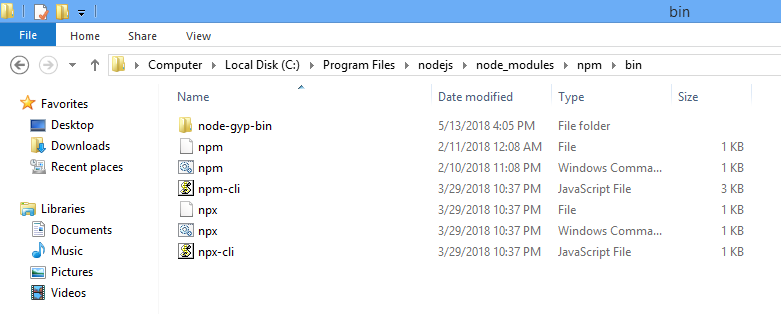
2. Set environment variable of Node.js installed location.


2. Install Firebase CLI (Command Line Interface)

Open run->cmd and hit npm install -g firebase-tools


3. Now login with your google account: run->cmd->firebase login. Maybe it will redirect on default browser for login on google account. So, do it carefully.

If you facing firebase login issue, you can try these.


firebase login --no-localhost
firebase login:ci --interactive
firebase login --interactive
firebase login:ci --no-localhost

If you successfully log in it. you will move here.


4. Create a project directory folder where you will find the cloud function of the project. like i have created AndroidStudioProjects folder.
5. Now, open cmd and run firebase init functions command.


It will show all project that you have created on firebase console or you can create new project on firebase
console from here.


6. When it's done you'll find three new things in your project directory:

1. "functions" folder
2. .firebaserc file
3.  firebase.json file


Building the Firebase Cloud Function

Now, Let's do some code for the cloud that will execute. For it, i'm going to install Visual Studio code and open index.js. 


You can build the Cloud Functions in a file name index.js. The index.js file is located inside the "functions" folder that you just created by initializing Cloud Functions.

Here's the Cloud Function: that will work on the firebase server.


Deploying the Cloud Function.

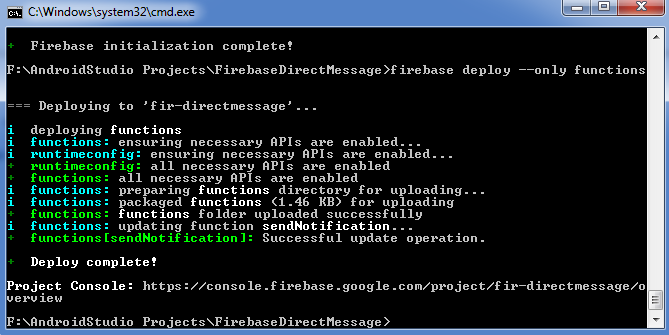
Once you created cloud function, deploy it with firebase deploy --only functions command to Firebase. Be patient this can take a while.


So, Here all that we need to start cloud function development. But if you still have any doubt, please feel free to clarify that in the comment section below.


Share:

Sunday, March 4, 2018

Firebase - Introduction of Cloud Functions

Back-end of any application is a heart that performs all task for the end user. Back-end executes tasks like: send push notifications, email and update other user information. It means that you no longer have to deploy your own server. You need only deploy your functions and all done. That's great for a mobile developer.
Share:

Get it on Google Play

React Native - Start Development with Typescript

React Native is a popular framework for building mobile apps for both Android and iOS. It allows developers to write JavaScript code that ca...